Why build a Concurrent File Downloader?
A file downloader is a simple application that allows you to download files over the Internet. Why bring concurrency into it? Let me tell you about the benefits:
- Concurrency allows multiple downloads to happen at the same time by running them in parallel through the use of multiple threads, thus speeding up the overall download speed and reducing idle time
- Better error handling as each download would run independently of the other and hence failure of one wouldn't affect the other
- Scalability comes into play as you also get to spawn threads, based on the number of downloads you need to run
Hence, we will be building such an application using Golang. Why Golang? Keep reading to find out why.
Concurrency in Go
Concurrency is all about running a single task into multiple sub-tasks and running them simultaneously. This can be achieved through multiple threads and cores making it an important aspect of software development, allowing us to maximise resource usage and improve performance
Go in retrospect allows us to write concurrent code easily. While other programming languages use operating system-level threads, Go's concurrency is based on CSP (Communicating Sequential Process).
Go offers us Goroutines (managed by the Go runtime) which are easy to spawn and have lighter memory and stack requirements as compared to traditional threads, Channels to talk between goroutines, Waitgroups which help us make sure that goroutines execute completely and more such tools which provide excellent support for Concurrency.
Now that we know how each tool would be deemed useful, let's explore each of them one by one so that it all makes sense in the end when we write the code for our app.
Goroutines
Inside a computer, the CPU splits the incoming programs into multiple parts which are then set to run on different cores. Golang, as compared to other languages makes it easier for us to take advantage of this
Go helps us to create goroutines to divide our code into multiple parts for us to be able to make our code concurrent. Running a section of the code as a goroutine means running that part of the code in the background (not the foreground).
Now, once a program is divided into multiple goroutines, the execution becomes concurrent. Having multiple cores would ensure parallelism (if the cores aren't pre-occupied that is) as different goroutines would run on different cores at the same time.
Having just one core would mean that the goroutines would be running concurrently on the same core, with the core switching between the goroutines as needed.
Note: Concurrency and Parallelism aren't mutually exclusive here. When there are multiple cores, tasks run between each core parallelly and within each single core, tasks are run concurrently. With only a single core, tasks are executed concurrently on it.
Since goroutines are easy to create and manage, they become a great choice for concurrent programming.
Starting a new Goroutine is as easy as using the go keyword followed by a function call. Here's an example:
package main
import (
"fmt"
)
func display(method string) {
for i := 0; i < 3; i++ {
fmt.Println(method, ":", i)
}
}
func main() {
display("direct")
go display("goroutine")
}
Here, the main method calls the display function with two different inputs. The second function call runs as a goroutine. If you run the program in its current state then you'll find that the program will give this as the output:
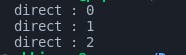
This is because as the goroutine runs in the background, the main function doesn't wait for it to finish executing. This results in only the regular function call's output being printed. To make sure that the program waits for a goroutine to finish executing, we use WaitGroups.
WaitGroup

A WaitGroup helps synchronize a program with goroutines by making sure that all goroutines finish execution before the termination of the main program. It does so by using the Add, Done and Wait functions. Let's look at the previous example but with a WaitGroup.
package main
import (
"fmt"
"sync"
)
func display(method string) {
for i := 0; i < 3; i++ {
fmt.Println(method, ":", i)
}
}
func main() {
var wg sync.WaitGroup
wg.Add(1)
// normal function call
display("direct")
// goroutine function call
go func() {
display("goroutine")
wg.Done()
}()
wg.Wait()
}
Here, we:
- Define a Waitgroup with var wg sync.WaitGroup and then use Add() to add a counter of 1 to it. This means that wg will have to wait for one goroutine to finish executing before allowing the program to terminate.
- The first function call proceeds normally but inside the anonymous goroutine function call, we call display("goroutine") and then pass in defer wg.Done().
- The latter waits for the goroutine to finish execution and then reduces the waitgroup counter by one via the Done() call (defer postpones the statement to run at the end of the function) so that the net counter value is zero.
Hence, Wait() waits for the counter to go to zero and as it does, the program is allowed to terminate. This is the output.
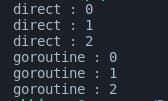
You can see here how the goroutine gets executed until the loop finishes execution.
Not passing the Done() call causes a deadlock issue as the main function is stuck waiting for the waitgroup counter to turn to 0. Try removing the Done() call and running the code again.
Goroutines run concurrently, enabling multiple tasks to execute simultaneously. However, for efficient task coordination and synchronization between the goroutines, we need to use Channels.
Channels

Channels provide a safe and structured way to pass values and communicate between Goroutines. They facilitate the exchange of data and coordination between concurrent operations.
You can think of a channel as a pipe that connects two goroutines.
Creating a channel is straightforward. You use make to create a chan type followed by the type of data you'd be sending through the channel:
intChan := make(chan int) // Create an integer channel
To send a value into a channel, we use the <- operator:
intChan <- 42 // Send the value 42 into the channel
To receive a value from a channel, we also use the <- operator:
intVar := <- intChan // Receive a value from the channel
Think of the arrow pointing towards where the data should flow. If it is towards the channel, then it means that the data is flowing into the pipe and if it is out from the channel (the 2nd case), it shows the data exiting from the pipe.
Let's incorporate channels into the previous code to show how its used
package main
import (
"fmt"
"sync"
)
func display(method string, done chan bool) {
for i := 0; i < 3; i++ {
fmt.Println(method, ":", i)
}
done <- true
}
func main() {
var wg sync.WaitGroup
wg.Add(2)
done := make(chan bool)
// First goroutine
go func() {
display("goroutine 1", done)
wg.Done()
}()
// Second goroutine
go func() {
display("goroutine 2", done)
wg.Done()
}()
// Use a separate goroutine to wait for the goroutines
// and to close the done channel
go func() {
wg.Wait()
close(done)
}()
for range done {
fmt.Println("A goroutine finished")
}
}
This code does the following:
- Creates a waitgroup wg and then adds a counter of 2 for the 2 separate goroutine calls to the display func
- Make a channel: done of type bool
- Runs the 2 separate goroutines within their anonymous functions. Each of these goroutines pass in the done channel alongside the string to be printed
- Runs a 3rd goroutine to wait for the previous goroutines and to close the channel. Note that this goroutine wasn't added to the counter because it runs wg.Wait() inside it and hence if the counter were increased to 3, it would have to wait for itself to be finished but that never would happen as it would keep waiting under wg.Wait() which is why the program would run into a deadlock
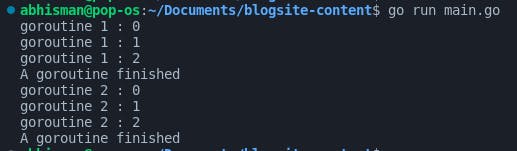
- A for loop keeps running in the foreground, ranging through the values obtained from the done channel and as soon as a true comes in, it prints: "A goroutine finished". The for loop then ends when the channel is closed by the 3rd goroutine
The output for the above code should be this:
Now, that we've talked about using channels to communicate between goroutines, we'll build our File Downloader :)
Writing the main Application code
Before we get into the actual application code, let me share how I've used the above-mentioned topics within the code:
- Goroutines: Goroutines are used to download files concurrently, instead of one at a time, which would ideally speed up the overall download process
- Channels: Channels are used for communication between goroutines. In the code, there are two channels: one used for denoting a successful download and the other for a failure
- WaitGroup: A Waitgroup is used to wait for all goroutines to finish their execution and to block the program termination until the counter goes to 0, i.e., all goroutines have finished
Now that we've talked about how we'll be utilizing each tool within the code, let's write the application code itself. I'll share the code below and then explain it, part-wise.
package main
import (
"fmt"
"io"
"net/http"
"os"
"sync"
)
type Download struct {
URL string
FileName string
}
func main() {
downloads := []Download{
{URL: "https://jsonplaceholder.typicode.com/posts/1", FileName: "file1.json"},
{URL: "https://jsonplaceholder.typicode.com/posts/2", FileName: "file2.json"},
// Add more downloads as needed
}
var wg sync.WaitGroup
resultCh := make(chan string, len(downloads)) // Channel for results
errorCh := make(chan error, len(downloads)) // Channel for errors
for _, download := range downloads {
wg.Add(1)
go func(download Download) {
defer wg.Done()
err := DownloadFile(download.URL, download.FileName)
if err != nil {
errorCh <- err
} else {
resultCh <- fmt.Sprintf("Downloaded: %s", download.FileName)
}
}(download)
}
go func() {
wg.Wait()
close(resultCh)
close(errorCh)
}()
// Print results and errors
for result := range resultCh {
fmt.Println(result)
}
for err := range errorCh {
fmt.Println("Error:", err)
}
}
func DownloadFile(URL string, FileName string) error {
resp, err := http.Get(URL)
if err != nil {
return err
}
defer resp.Body.Close()
data, err := io.ReadAll(resp.Body)
if err != nil {
return err
}
return os.WriteFile(FileName, data, 0644)
}
- The code first defines the package and imports the necessary libraries
- Next, we define a struct called Download that has two fields: URL and Filename. This struct is used to store the information about the download
- Inside the main function, we store the information on where to download the file from. For this application, we'll be downloading json content from jsonplaceholder.typicode.com and then write it to files. You can replace this with any endpoint for your usage
- We then create a WaitGroup called wg and 2 channels: resultCh and errorCh. The earlier for transmitting success messages and the latter for errors.
- A loop is then started to iterate over the list of files to be downloaded. Before starting each file download in its goroutine, we add a counter of 1 by running wg.Add(1)
- Then for each file, a goroutine is started by passing in an anonymous function with the go keyword. The goroutine calls the DownloadFile function, passing the URL and filename of the file to be downloaded as arguments and depending on the status of the download, sends a message through the respective channel
- Inside the DownloadFile function:
- We first get the json from the URL via the http.Get() method and then make sure to close the response body at the end through defer resp.Body.Close()
- We then get the json data from the response body and after storing it, we write it into a file which is named using the FileName var. os.WriteFile takes care of opening and closing the file so that we don't have to worry about that
- The DownloadFile function downloads the file and depending on the status of the download, returns the suitable message.
- The output from DownloadFile() is read inside the for loop and if there is an error, it is received and then sent to the errorCh channel. Instead, If the download is successful, the success message is sent through the resultCh channel.
- After the for loop, we call the wg.Wait() method (to block the program until all the goroutines have finished their execution) and close the 2 channels inside a separate goroutine
- 2 loops are started to receive the results and errors from the respective channels using the range keyword. The loops continue until the channels are closed and depending on whether it's an error or a successful result, the appropriate message is printed to the terminal.
Upon a successful run, this is what you would be seeing:

with 2 new files in your directory: file1.json and file2.json
Conclusion
In conclusion, in the blog above we learnt about the development of a concurrent file downloader using the different concurrency features Go has to offer. Concurrency in the context of a file-downloading application enables simultaneous downloads, enhancing download speed and error handling while allowing for scalability. This approach leads to faster and more robust file downloads, making it a valuable tool for various downloading tasks.
If you found value in this blog, then please consider sharing it with your peers, thank you :))